
Brian Wisniach
Content Marketing
TL;DR:
Checkout integration is how you connect extra functionality (protection, warranties, resale, support, upsells) to the actual point of purchase, rather than bolting it on somewhere else in the funnel.
How you go about it depends entirely on which platform you’re running. Get it right, and checkout stops being a payment form and starts being a place where you can actually sell something.
What “checkout integration” actually means
People use the term loosely, so let’s be precise for a moment (it’ll save you a headache later). There are really three ways to add something to checkout, and they’re not interchangeable.
Native platform tools are built into the checkout itself, no third party involved. Fastest to launch, but limited to whatever the platform decided to expose.
App or plugin integrations connect a third-party provider through the platform’s own extension system. More flexibility, still no custom code required.
Custom API or provider integrations hook a provider directly into a bespoke checkout. Full control, but now it’s an engineering project.
Which one you end up using isn’t really a choice so much as a consequence of which e-commerce platform you’re already on.
Platform by platform, what this looks like
Ask three people what checkout integration looks like, and you'll get three answers, because they're each describing a different platform. Here's what it actually looks like on each one.
Platform | How you integrate | Tradeoff |
Shopify | Checkout Extensibility (UI extensions, post-purchase extensions, Functions) | Fast, sanctioned, but scoped to what Shopify’s extension points allow |
Wix | Native app market plus built-in checkout customization | Simple, but shallower than Shopify’s extension model |
WooCommerce | Plugin ecosystem, open by default | More flexible out of the box, more variance in plugin quality |
Custom-built site | Direct provider or API integration | Total control, real engineering lift |
Something to note: as of August 26, 2026, Shopify has stopped supporting the legacy Additional Scripts box and the last of checkout.liquid-era scripting customizations on your Thank You and Order Status pages, and auto-upgrades your store whether you’ve prepared for it or not. If you’ve got tracking pixels, affiliate tags, or a protection widget still living in that legacy setup, this is the actual reason to look at checkout integration this week, not next quarter.
The general pattern, once you strip away the platform-specific detail: native is faster and simpler, but you’re working inside someone else’s constraints. Custom or third-party takes more resourcing up front, the tradeoff being you're not stuck re-platforming the moment you outgrow native's limits.
What opens up once checkout is actually integrated
'Payments and tax' is the framing most people default to, and it's a small slice of what's actually available. Once checkout is properly integrated, you're opening up real estate for:
Additional return and order protection flexibility (like Seel's Worry-Free Purchase, as one example of a total post-purchase solution)
Package protection for shipping-related issues
Extended warranties on higher-consideration items
Inventory resale or take-back paths (worth noting: this typically surfaces after the return window closes, inside a resolution portal, not literally at the checkout button itself)
AI-assisted support and order-status help
Product recommendations and upsells
None of that works if checkout integration is an afterthought, and it only works if the plumbing is actually there to support it.
Why this compounds instead of just adding up
None of this is a one-time win. Every order that runs through a properly integrated checkout adds to a real, growing dataset (attach rates on protection and warranties, which products drive resale interest, where support tickets actually originate). That data is what turns "we added a protection option" into "we know exactly which SKUs need it, priced how, shown when."
Compare that to the alternative: bolting tools onto checkout piecemeal as needs arise. Each addition means its own catalog sync, its own support queue, its own vendor relationship, its own way of quietly breaking during a platform update. That overhead doesn't stay flat, it grows with every SKU, every order, every new sales channel you add. A properly integrated checkout is infrastructure that scales with you. A stack of bolted-on tools runs the risk of becoming a maintenance bill that scales faster than you do.
The merchants treating checkout as infrastructure now are building toward a system that gets easier to run as they grow. The ones still treating it as "done at payment" are building toward the opposite.
What to know about compliance before you add anything
A quick note here. The FTC’s rule on unfair or deceptive fees (sometimes called the “junk fees” rule, effective May 2025) requires certain sellers to show the full price upfront rather than dripping in mandatory charges at the end. It’s worth knowing this rule exists and where regulatory pressure on pricing transparency is heading generally, but as of this writing it’s scoped specifically to live-event ticketing and short-term lodging, not e-commerce checkout broadly.
The safer, more universal principle, and the one worth building your process around regardless of what’s technically in scope: Any optional add-on, protection included, should be clearly labeled and priced separately with a clear way to opt out.
A handful of states (California, Minnesota, Virginia, Colorado, and Connecticut among them) have their own disclosure requirements that are more directly relevant here. Know your state before you launch anything. This is general information, not legal advice, run your specific setup by counsel before rolling anything out.
Getting this live without breaking what already works
Adding the fee to checkout takes an afternoon. Getting shoppers to not notice anything changed except a new option is the actual work.
Keep new elements native to the checkout, not visually bolted on. Match existing type, spacing, and button styles first, before you touch copy. Anything that looks pasted in from a different design system reads as an upsell.
Lead with one visible benefit. Put the price next to a single plain-language line that says what the shopper gets. A long list of benefits adds reading, not reasons to buy, and tucking the details behind a tooltip or "learn more" link means most shoppers never see them. For example:
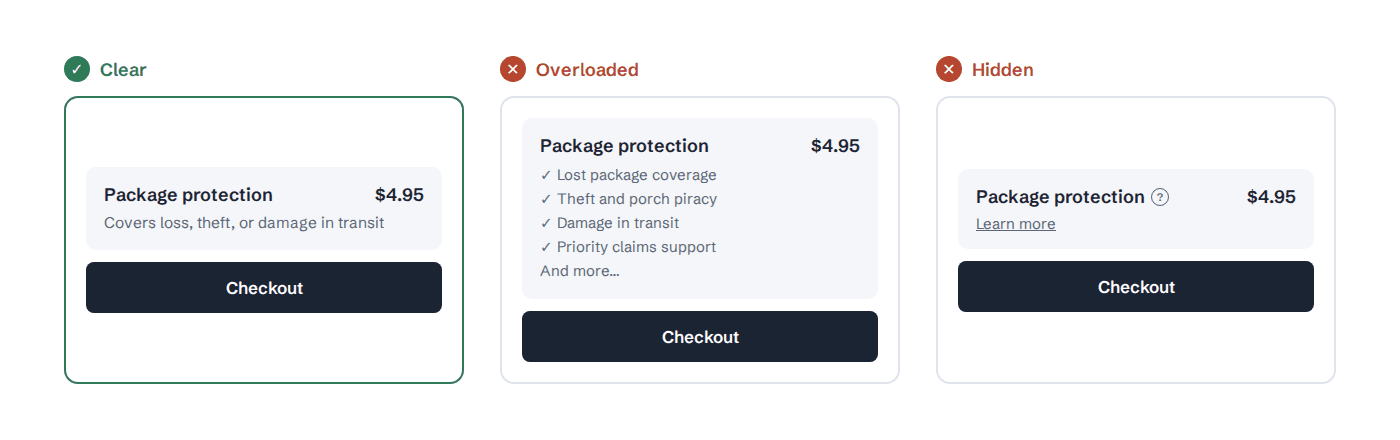
Give shoppers one clear next step. Two equally weighted buttons split attention at the exact moment you want a decision. Keep one primary action, and make the alternative easy to find and plainly worded.
Roll out to a slice of traffic first. A checkout element that quietly tanks completion rate is far cheaper to catch on 10% of orders than on all of them.
Test before peak season, not during one. The Shopify deadline above is a reminder of why timing isn't a minor detail here.
Have a rollback plan before launch, not after something breaks. Figuring that out mid-incident, during your highest-traffic week, is how a small mistake becomes a real one.
What this looks like already built
Here’s the thing about checkout integration nobody tells you upfront: the technical part is usually the easy part. The harder question is what you actually want to offer once the plumbing exists. Seel runs across all four paths above: native app on Shopify and Wix, plugin-style setup on WooCommerce, and a direct API for custom-built sites, and it bundles protection, warranties, and resale under one integration instead of four separate ones.
If you want to see what that actually looks like on your specific stack, talk to sales and we’ll walk through it.
Frequently asked questions about adding checkout integration
What’s the most reliable way to offer package protection at checkout?
A native or app-based integration through your platform’s sanctioned extension system (Shopify Checkout Extensibility, Wix’s app market, WooCommerce plugins) is more reliable long term than a bolted-on script, since it survives platform updates that break unsupported customizations.
Which platforms support both shipping protection and extended warranties in one checkout flow?
Providers built as a single platform, rather than separate point solutions per product, are the ones that can offer both without requiring two separate integrations. Seel is one example, covering shipping protection and extended warranties through the same setup.
Is there a recommerce or resale option that integrates with an existing checkout?
Yes, though resale typically operates inside a post-purchase resolution portal rather than the checkout screen itself, surfacing once a return window has closed as an alternative to a standard return. Seel's Resale Agency works this way, for example, built into the same Resolution Center shoppers already use for claims and status tracking.
Do I need custom development to add checkout add-ons?
Not necessarily. Shopify, Wix, and WooCommerce all support native or app-based integrations that don’t require custom code. Custom development becomes necessary mainly for fully custom-built storefronts.